Further Usage
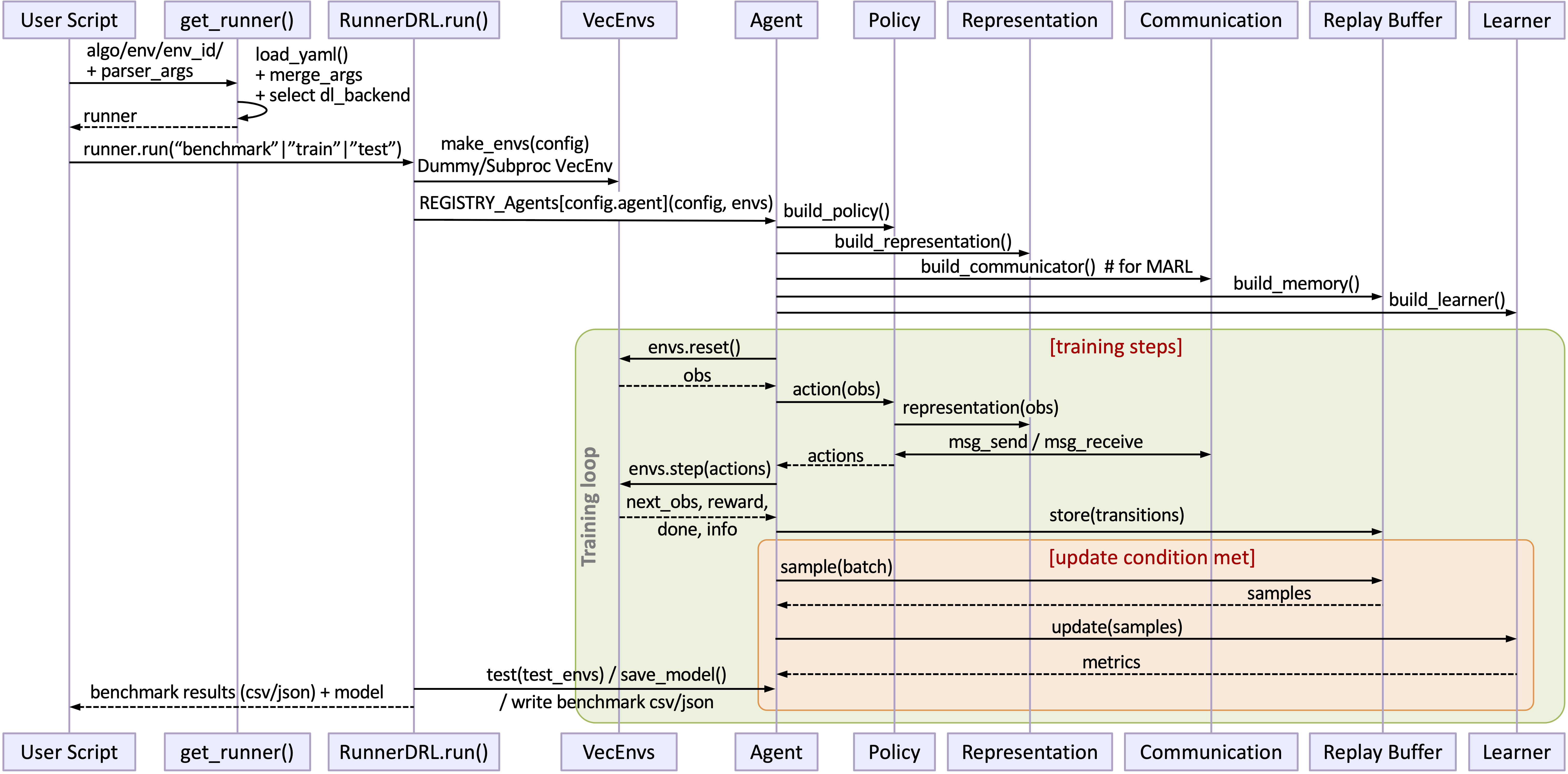
The previous page demonstrated how to directly run an algorithm by calling the runner. In order to help users better understand the internal implementation process of “XuanCe”, and facilitate further algorithm development and implementation of their own reinforcement learning tasks, this section will take the PPO algorithm training on the MuJoCo environment task as an example, and provide a detailed introduction on how to call the API from the bottom level to implement reinforcement learning model training.

Step 1: Create config file
A config file should contains the necessary arguments of a PPO agent, and should be a YAML file. Here we show a config file named “ppo_configs/ppo_mujoco_config.yaml” for MuJoCo environment in gym.
dl_backend: "torch"  # The deep learning backend. Choices: "torch", "mindspore", "tensorlayer"
project_name: "XuanCe_Benchmark"
logger: "tensorboard"  # Choices: tensorboard, wandb.
wandb_user_name: "your_user_name"  # The username of wandb when the logger is wandb.
render: False # Whether to render the environment when testing.
render_mode: 'rgb_array' # Choices: 'human', 'rgb_array'.
fps: 50  # The frames per second for the rendering videos in log file.
test_mode: False  # Whether to run in test mode.
device: "cuda:0"  # Choose an calculating device.
distributed_training: False  # Whether to use multi-GPU for distributed training.
master_port: '12355'  # The master port for current experiment when use distributed training.

agent: "PPO"  # The agent name.
env_name: "MuJoCo"  # The environment device.
env_id: "Ant-v4"  # The environment id.
env_seed: 1
vectorize: "DummyVecEnv"  # The vecrized method to create n parallel environments. Choices: DummyVecEnv, or SubprocVecEnv.
learner: "PPO_Learner"
policy: "Gaussian_AC"  # choice: Gaussian_AC for continuous actions, Categorical_AC for discrete actions.
representation: "Basic_MLP"  # The representation name.

representation_hidden_size: [256,]  # The size of hidden layers for representation network.
actor_hidden_size: [256,]  # The size of hidden layers for actor network.
critic_hidden_size: [256,]  # The size of hidden layers for critic network.
activation: "leaky_relu"  # The activation function for each hidden layer.
activation_action: 'tanh'  # The activation function for the last layer of actor network.

seed: 79811  # The random seed.
parallels: 16  # The number of environments to run in parallel.
running_steps: 1000000  # The total running steps for all environments.
horizon_size: 256  # the horizon size for an environment, buffer_size = horizon_size * parallels.
n_epochs: 16  # The number of training epochs.
n_minibatch: 8  # The number of minibatch for each training epoch. batch_size = buffer_size // n_minibatch.
learning_rate: 0.0004  # The learning rate.

vf_coef: 0.25  # Coefficient factor for critic loss.
ent_coef: 0.0  # Coefficient factor for entropy loss.
target_kl: 0.25  # For PPO_KL learner.
kl_coef: 1.0  # For PPO_KL learner.
clip_range: 0.2  # The clip range for ratio in PPO learner.
gamma: 0.99  # Discount factor.
use_gae: True  # Use GAE trick.
gae_lambda: 0.95  # The GAE lambda.
use_advnorm: True  # Whether to use advantage normalization.

use_grad_clip: True  # Whether to clip the gradient during training.
clip_type: 1  # Gradient clip for Mindspore: 0: ms.ops.clip_by_value; 1: ms.nn.ClipByNorm()
grad_clip_norm: 0.5  # The max norm of the gradient.
use_actions_mask: False  # Whether to use action mask values.
use_obsnorm: True  # Whether to use observation normalization.
use_rewnorm: True  # Whether to use reward normalization.
obsnorm_range: 5  # The range of observation if use observation normalization.
rewnorm_range: 5  # The range of reward if use reward normalization.

test_steps: 10000  # The total steps for testing.
eval_interval: 5000  # The evaluate interval when use benchmark method.
test_episode: 5  # The test episodes.
log_dir: "logs/ppo/"  # The main directory of log files.
model_dir: "models/ppo/"  # The main directory of model files.
Step 2: Get the attributes of the example
This section mainly includes parameter reading, environment creation, model creation, and model training. First, create a ppo_mujoco.py file. The code writing process can be divided into the following steps:
Step 2.0 Import necessary tools
import argparse
import numpy as np
from copy import deepcopy
from xuance.common import get_configs, recursive_dict_update
from xuance.environment import make_envs
from xuance.torch.utils.operations import set_seed
from xuance.torch.agents import PPO_Agent
Step 2.1 Get the hyper-parameters of command in console
Define the following function parse_args(),
which uses the Python package argparse to read the command line instructions and obtain the instruction parameters.
import argparse

def parse_args():
    parser = argparse.ArgumentParser("Example of XuanCe: PPO for MuJoCo.")
    parser.add_argument("--env-id", type=str, default="InvertedPendulum-v4")
    parser.add_argument("--test", type=int, default=0)
    parser.add_argument("--benchmark", type=int, default=1)

    return parser.parse_args()
Step 2.2 Get all attributes of the example
First, the parse_args() function from Step 2.1 is called to read the command line instruction parameters,
and then the configuration parameters from Step 1 are obtained.
if __name__ == "__main__":
    parser = parse_args()
    configs_dict = get_configs(file_dir="ppo_configs/ppo_mujoco_config.yaml")
    configs_dict = recursive_dict_update(configs_dict, parser.__dict__)
    configs = argparse.Namespace(**configs_dict)
In this step, the get_configs() method from “XuanCe” is called.
This method can read the configuration files from the specified directory, and return a dictionary variable.
Then, the recursive_dict_update method of “XuanCe” is called.
This method can update the configurations of the .yaml file from the parser variable.
Finally, convert the dictionary variable as Namespace type.
Step 3: Create environment, PPO Agent, and run the task
import argparse
import numpy as np
from copy import deepcopy
from xuance.common import get_configs, recursive_dict_update
from xuance.environment import make_envs
from xuance.torch.utils.operations import set_seed
from xuance.torch.agents import PPO_Agent


def parse_args():
    parser = argparse.ArgumentParser("Example of XuanCe: PPO for MuJoCo.")
    parser.add_argument("--env-id", type=str, default="InvertedPendulum-v4")
    parser.add_argument("--test", type=int, default=0)
    parser.add_argument("--benchmark", type=int, default=1)

    return parser.parse_args()


if __name__ == "__main__":
    parser = parse_args()
    configs_dict = get_configs(file_dir="ppo_configs/ppo_mujoco.yaml")
    configs_dict = recursive_dict_update(configs_dict, parser.__dict__)
    configs = argparse.Namespace(**configs_dict)

    set_seed(configs.seed)  # Set the random seed.
    envs = make_envs(configs)  # Make the environment.
    Agent = PPO_Agent(config=configs, envs=envs)  # Create the PPO agent.

    train_information = {"Deep learning backend": configs.dl_backend,
                         "Calculating device": configs.device,
                         "Algorithm": configs.agent,
                         "Environment": configs.env_name,
                         "Scenario": configs.env_id}
    for k, v in train_information.items():  # Print the training information.
        print(f"{k}: {v}")

    if configs.benchmark:
        def env_fn():  # Define an environment function for test algo.
            configs_test = deepcopy(configs)
            configs_test.parallels = configs_test.test_episode
            return make_envs(configs_test)

        train_steps = configs.running_steps // configs.parallels
        eval_interval = configs.eval_interval // configs.parallels
        test_episode = configs.test_episode
        num_epoch = int(train_steps / eval_interval)

        test_scores = Agent.test(test_episodes=test_episode, test_envs=test_envs, close_envs=False)
        Agent.save_model(model_name="best_model.pth")
        best_scores_info = {"mean": np.mean(test_scores),
                            "std": np.std(test_scores),
                            "step": Agent.current_step}
        for i_epoch in range(num_epoch):
            print("Epoch: %d/%d:" % (i_epoch, num_epoch))
            Agent.train(eval_interval)
            test_scores = Agent.test(test_episodes=test_episode, test_envs=test_envs, close_envs=False)

            if np.mean(test_scores) > best_scores_info["mean"]:
                best_scores_info = {"mean": np.mean(test_scores),
                                    "std": np.std(test_scores),
                                    "step": Agent.current_step}
                # save best model
                Agent.save_model(model_name="best_model.pth")
        # end benchmarking
        test_envs.close()
        print("Best Model Score: %.2f, std=%.2f" % (best_scores_info["mean"], best_scores_info["std"]))
    else:
        if configs.test:
            configs.parallels = configs.test_episode
            test_envs = make_envs(configs)
            Agent.load_model(path=Agent.model_dir_load)
            scores = Agent.test(test_episodes=configs.test_episode, test_envs=test_envs, close_envs=True)
            print(f"Mean Score: {np.mean(scores)}, Std: {np.std(scores)}")
            print("Finish testing.")
        else:
            Agent.train(configs.running_steps // configs.parallels)
            Agent.save_model("final_train_model.pth")
            print("Finish training!")

    Agent.finish()
After finishing the above three steps, you can run the python_mujoco.py file in console and train the model:
python ppo_mujoco.py --env-id Ant-v4
The source code of this example can be visited at the following link:
https://github.com/agi-brain/xuance/blob/master/examples/ppo/ppo_mujoco.py
Distributed training with multi-GPUs
XuanCe supports multi-GPU training to maximize GPU resource utilization, enabling more efficient DRL model training.
To train DRL models using multiple GPUs, you need to set distributed_training to True,
the following parameters are relevant:
distributed_training (bool): Specifies whether to enable multi-GPU distributed training. Set to True to activate distributed training; otherwise, it remains disabled.
master_port (int): Defines the master port for the current experiment when distributed training is enabled.`: The master port for current experiment when use distributed training.
Hyperparameters Tuning
XuanCe integrates an Optuna-based hyperparameter optimization module, supporting both single-objective and multi-objective search, while maintaining full compatibility with YAML-based configuration and reproducibility.
The tuning process is fully integrated with XuanCe’s training pipeline and logging system.
Starting from Default Configurations
Each algorithm in XuanCe is shipped with recommended default configurations that have been validated in our benchmark experiments. These default settings are located in:
xuance/configs/<algorithm>/<environment>.yaml
For most tasks, we recommend starting from the provided default configuration and modifying only a small subset of key parameters.
Click Configuration Examples to see more examples of configurations. We suggest modifying one or two parameters at a time while keeping other settings fixed for controlled experiments.
Manually Adjusting Sensitive Hyperparameters
In practice, only a small subset of hyperparameters significantly affects performance.
For most algorithms, the following parameters are the most sensitive:
Learning Rate
The learning rate is often the most critical hyperparameter. If training is unstable or diverging:
try reducing it by a factor of 2–10.
Batch Size
Larger batch sizes improve stability but increase memory usage. Smaller batch sizes may improve sample efficiency but increase variance.
Discount Factor (gamma)
Common values range from 0.95 to 0.999. For long-horizon tasks, larger values are recommended.
Exploration Parameters
DQN: epsilon schedule
SAC: entropy coefficient
PPO: entropy coefficient or clip range
We recommend adjusting these parameters first before modifying secondary hyperparameters. In practice, tuning these primary parameters typically accounts for the majority of performance improvements.
Automatic Hyperparameter Optimization
Single-Objective
We provide the HyperParameterTuner API for optimizing a single objective (e.g., test score).
Example usage (see full code by clicking tune_dqn.py):
from xuance.common import HyperParameterTuner, set_hyperparameters

tuner = HyperParameterTuner(
    algo='dqn',
    config_path='./examples/dqn/dqn_configs/dqn_cartpole.yaml',
    running_steps=1000,
    test_episodes=2
)

selected_hyperparameters = tuner.select_hyperparameter(['learning_rate'])

study = tuner.tune(selected_hyperparameters, n_trials=30)
Users may override default parameter ranges via set_hyperparameters.
Optimization history can be visualized using:
from optuna.visualization import plot_optimization_history
Multi-Objective
XuanCe also supports multi-objective hyperparameter tuning via the MultiObjectiveTuner API.
Example usage (see full code by clicking tune_dqn_multiobjective.py):
from xuance.common import MultiObjectiveTuner

tuner = MultiObjectiveTuner(
    algo='dqn',
    config_path='./examples/dqn/dqn_configs/dqn_cartpole.yaml',
    running_steps=10000,
    test_episodes=2
)

study = tuner.tune(
    selected_hyperparameters,
    n_trials=30,
    directions=['maximize', 'maximize'],
    selected_objectives=['test_score', 'Qloss']
)
The Pareto front can be visualized using:
from optuna.visualization import plot_pareto_front
Design Principles
All hyperparameters remain explicitly defined in YAML files.
Tuning modifies parameters programmatically without breaking reproducibility.
Integration with Optuna allows flexible search strategies (grid, random, Bayesian).
Compatible with distributed training settings.
For full API documentation, see APIs → common → tuning_tools.
Overall Workflow