CURL: Contrastive Unsupervised Representations for Reinforcement Learning
Overview
Contrastive Unsupervised Representations for Reinforcement Learning (CURL) is a sample-efficient, model-free deep reinforcement learning agent that learns to represent states by contrasting multiple data augmentations of the same state. CURL learns representations by employing a contrastive loss similar to the one used in the computer vision self-supervised learning method Contrastive Predictive Coding (CPC). The learned representations are then used by a standard DQN agent to learn the policy.
CURL consists of two components:
A convolutional neural network (CNN) encoder that encodes observations into representations.
A DQN agent that uses the representations to learn the policy.
CURL learns representations by contrasting multiple data augmentations of the same state. The contrastive loss encourages the encoder to learn representations that are invariant to data augmentations while preserving the information necessary for control.
The key insight of CURL is that it learns representations without access to actions or rewards, making it an unsupervised representation learning method. This is particularly useful in environments where rewards are sparse or delayed.
Core Components
CURL has two main components:
Encoder
The encoder is a convolutional neural network that encodes observations into representations. The encoder is trained using a contrastive loss that encourages it to learn representations that are invariant to data augmentations while preserving the information necessary for control.
DQN Agent
The DQN agent uses the representations learned by the encoder to learn the policy. The DQN agent is a standard DQN agent that uses a deep neural network to approximate the Q-function.
Contrastive Loss (InfoNCE)
CURL uses a contrastive loss similar to the one used in Contrastive Predictive Coding (CPC). The contrastive loss encourages the encoder to learn representations that are invariant to data augmentations while preserving the information necessary for control.
The InfoNCE loss is defined as:
where:
\(q\) is the query representation (encoded augmented observation)
\(k^+\) is the positive key (encoded differently augmented version of the same observation)
\(k^-\) are the negative keys (encoded augmented observations from different states)
\(\tau\) is the temperature parameter
\(\text{sim}(u, v)\) is the cosine similarity between \(u\) and \(v\)
Q-Learning with Contrastive Representations
After learning representations using the contrastive loss, CURL uses a standard DQN agent to learn the policy. The DQN agent uses the representations learned by the encoder to approximate the Q-function.
The Q-network is trained using the mean-squared error (MSE) loss between the predicted Q-value and the target:
where \(y = r + \gamma \max_{a'}{Q(s', a'; \theta^{-})}\), and \(\theta^{-}\) is the parameters of the target network.
CURL uses an \(\epsilon\)-greedy policy to explore random actions with probability \(\epsilon\) and exploit the learned policy otherwise:
Hyperparameters
Key hyperparameters for CURL include:
temperature: Temperature parameter for InfoNCE loss (default: 1.0)tau: Momentum update coefficient for target encoder (default: 0.05)repr_lr: Learning rate for representation learning (default: 0.0001)sync_frequency: Frequency of synchronizing target network (default: 100)
Algorithm
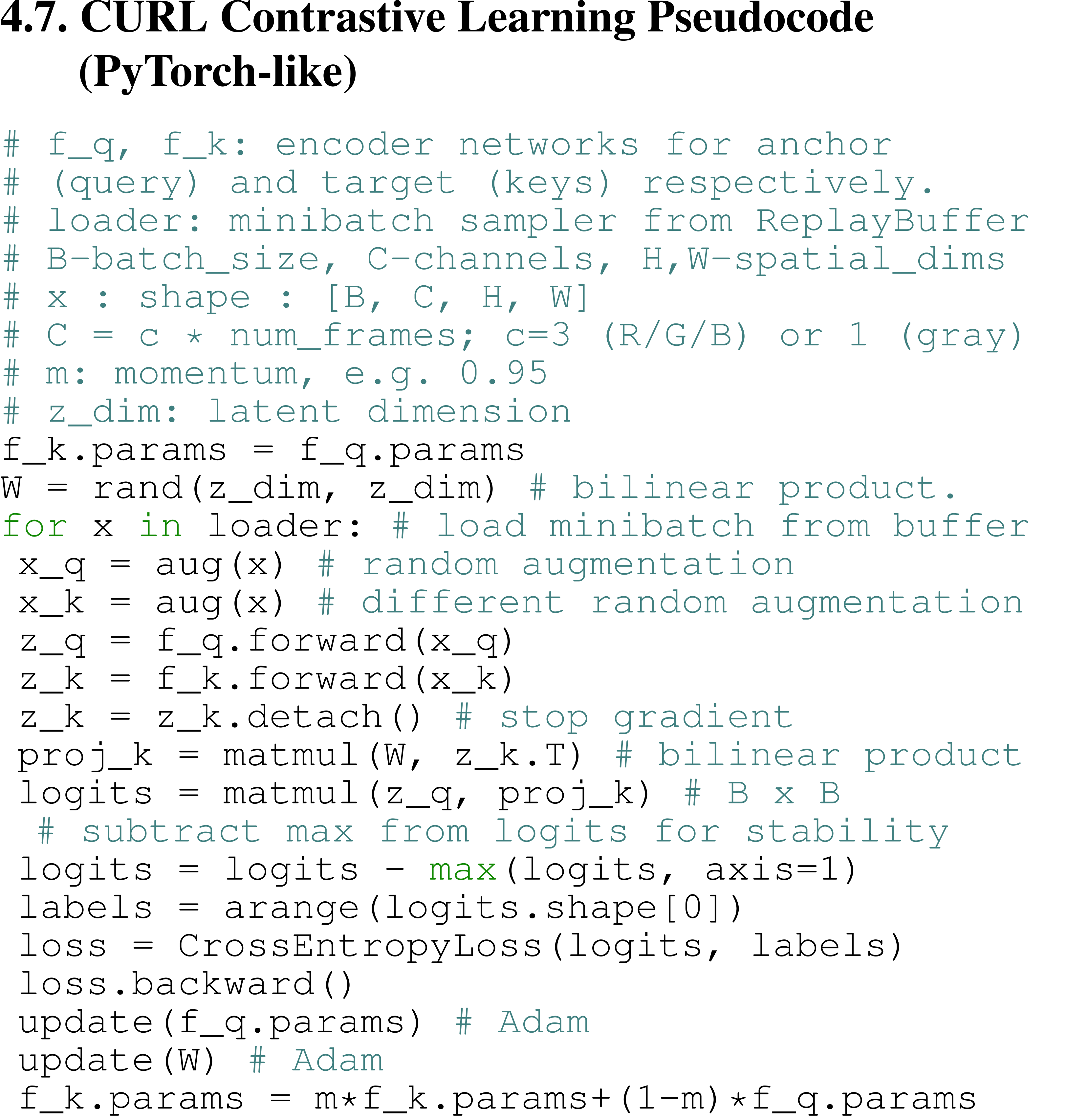
The full algorithm for training CURL is presented in Algorithm 1:
Framework
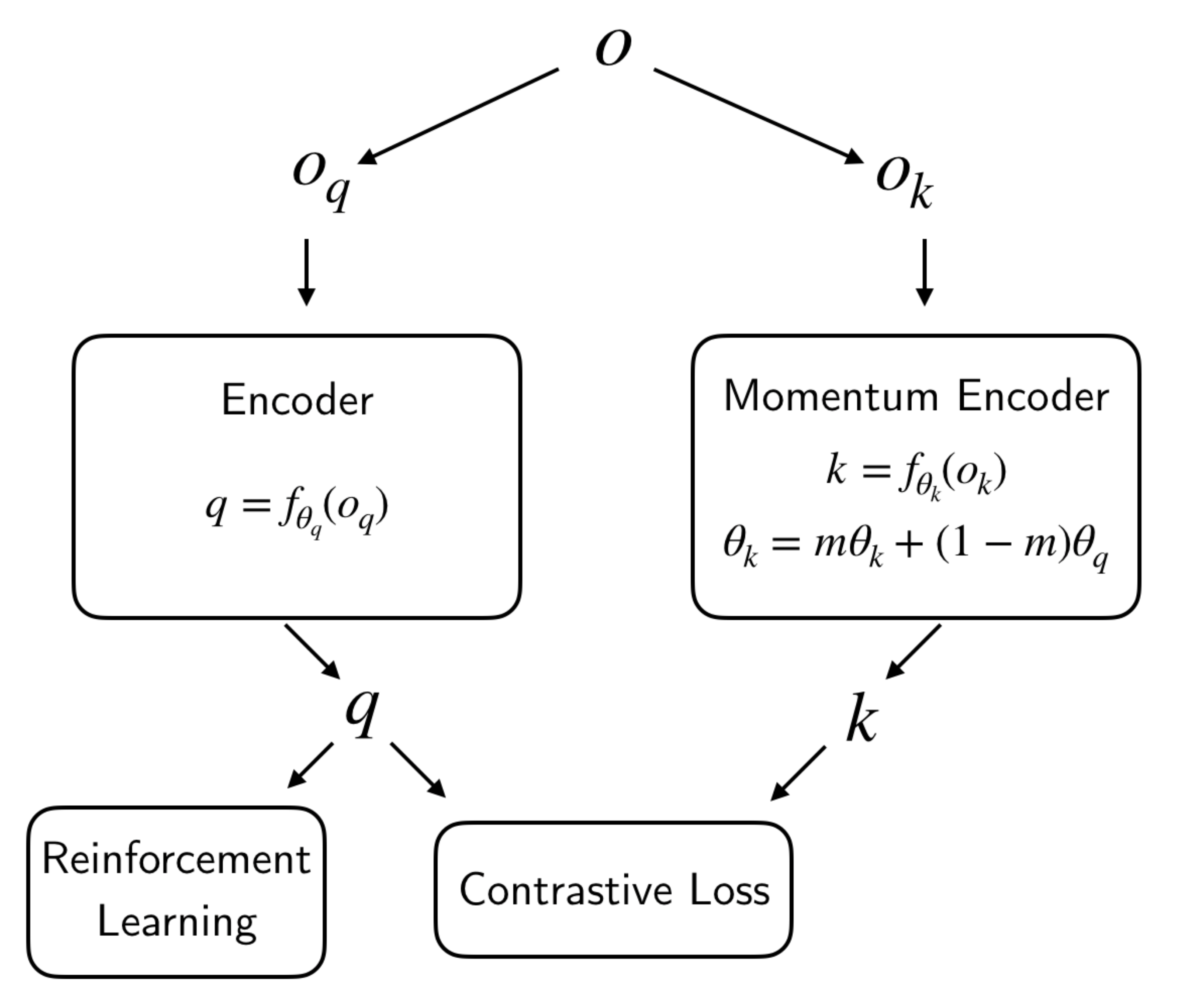
The overall agent-environment interaction of CURL, as implemented in XuanCe, is illustrated in the figure below.
Run CURL in XuanCe
Before running CURL in XuanCe, you need to prepare a conda environment and install xuance following
the installation steps.
Run Build-in Demos
After completing the installation, you can open a Python console and run CURL directly using the following commands:
import xuance

runner = xuance.get_runner(
    algo='curl',
    env='atari',  # Currently only atari environments are supported.
    env_id='ALE/Breakout-v5',  # Choices: ALE/Breakout-v5, ALE/Pong-v5, etc.
)
runner.run()  # Or runner.benchmark()
Run With Self-defined Configs
If you want to run CURL with different configurations, you can build a new .yaml file, e.g., my_config.yaml.
Then, run the CURL by the following code block:
import xuance

runner = xuance.get_runner(
    algo='curl',
    env='atari',  # Currently only atari environments are supported.
    env_id='ALE/Breakout-v5',  # Choices: ALE/Breakout-v5, ALE/Pong-v5, etc.
    config_path="my_config.yaml",  # The path of my_config.yaml file should be correct.
)
runner.run()  # Or runner.benchmark()
To learn more about the configurations, please visit the tutorial of configs.
Run With Custom Environment
If you would like to run XuanCe’s CURL in your own environment that was not included in XuanCe,
you need to define the new environment following the steps in
New Environment Tutorial.
Then, prepapre the configuration file
curl_myenv.yaml.
After that, you can run CURL in your own environment with the following code:
import argparse
from xuance.common import load_yaml
from xuance.environment import REGISTRY_ENV
from xuance.environment import make_envs
from xuance.torch.agents import CURL_Agent

configs_dict = load_yaml(file_dir="curl_myenv.yaml")
configs = argparse.Namespace(**configs_dict)
REGISTRY_ENV[configs.env_name] = MyNewEnv

envs = make_envs(configs)  # Make parallel environments.
Agent = CURL_Agent(config=configs, envs=envs)  # Create a CURL agent from XuanCe.
Agent.train(configs.running_steps // configs.parallels)  # Train the model for numerous steps.
Agent.save_model("final_train_model.pth")  # Save the model to model_dir.
Agent.finish()  # Finish the training.
Citation
@inproceedings{laskin2020curl,
  title={Curl: Contrastive unsupervised representations for reinforcement learning},
  author={Laskin, Michael and Srinivas, Aravind and Abbeel, Pieter},
  booktitle={International Conference on Machine Learning},
  pages={5639--5650},
  year={2020},
  organization={PMLR}
}